
Every tenant walled off
Postgres row-level security per tenant and per mode, tenant-prefixed photo storage, and per-tenant quotas. The database enforces the boundary on every query.
Shoppers gather pieces into a fitting room. Riti styles them into complete looks, renders the outfit on the shopper’s own photo, and sends the whole look to your cart — on your site, in your brand, attributed to the order.

A shopper uploads one photo and adds pieces from your product pages. Up to four garments, such as a jacket, top, trouser and shoes, are layered onto that photo in a single render, so what they see is the whole outfit on their own body.


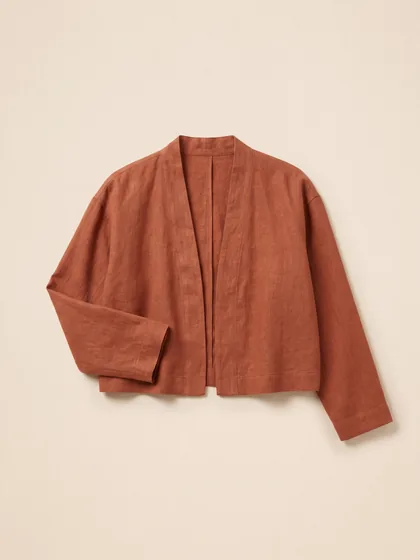
Cropped Linen Jacket$148 · S

Ribbed Knit Tank$54 · S

Wide-Leg Trouser$128 · 28
Seeing a jacket on yourself answers one question. What shoppers stall on is the next one: does it go with what’s already in the bag? Every fitting room comes back with three looks, ranked, plus the pairing the stylist would change, always with a swap.
The cropped jacket gives the wide-leg trouser a waist to work against, and the ribbed tank keeps the layering light enough for the linen.

Same trouser without the jacket. The tank’s higher neckline stops the silhouette from reading top-heavy.

Both hit at the waist, so nothing anchors the outfit and the leg looks shorter than it is.
→ Try the wide-leg trouser insteadCriticism ships with a fix, or it doesn’t ship.
Looks are built from real combinations in your catalogue: one top, one bottom or a dress, plus optional outerwear, shoes and an accessory. Only then are they ranked. The stylist can’t invent a look you don’t sell.
Reasons are specific to the two garments: proportion, layering, neckline, colour. Filler like “versatile piece” is rejected before a shopper sees it.
Sizes are chosen per piece, in the same screen, and the outfit lands in your cart in one tap. Three lines go into the basket at once, handed to your own cart through a single callback.

The same engine that runs the Shopify app, rebuilt as a multi-tenant platform for any storefront: your domain, your cart, your brand, with the controls an enterprise team expects to find on day one.
Postgres row-level security per tenant and per mode, tenant-prefixed photo storage, and per-tenant quotas. The database enforces the boundary on every query.
Test keys render for real but are never billed and have their own daily cap. Live and test data are separated row by row.
Publishable keys work only from your allowed origins; short-lived session tokens minted by your backend; secret keys stay server-side. Roll a key with a grace period.
Try-on succeeded or failed, added to cart, look saved and conversion attributed. Each is HMAC-signed, retried with backoff and redeliverable from the console.
Owner, developer and viewer roles. Usage, keys, origins, widget appearance, webhook deliveries, analytics with CSV export, and a switch between test and live.
Per-tenant rate limits, daily burst caps and a hard ceiling on usage. Render providers fail over automatically, and a breaker pauses before a bad day reaches your shoppers.
Every cart line carries the ID of the try-on that produced it. When your backend reports the order, Riti credits exactly those lines, once per order and line, so the number on your dashboard is a match against real orders.
No platform plugin and no theme surgery. The SDK draws the try-on and fitting room on your product pages; your backend reports orders with a secret key.
<script src="https://api.rititech.app/sdk/v1/riti.js"></script>
<script>
  Riti.init({
    publishableKey: "pk_live_…",
    getSessionToken: () => fetch("/riti-session", { method: "POST" })
      .then((r) => r.json()),
    onAddToCart(items) { /* each item carries its eventId */ },
  });
  Riti.mount("#riti", { product: { id, title, imageUrl, price, variants } });
</script>

# your backend, when the order lands
POST /api/v1/conversions # Authorization: Bearer sk_live_…/sdk/v1/ path or an exact, immutable version with SRI hashes.onAddToCart(items) or a riti:add-to-cart DOM event. Riti never touches checkout.tryon:success, add-to-cart, look:saved, room:open for your analytics.npm package, React and Vue wrappers, a <riti-try-on> web component, headless API mode, async render jobs and native mobile SDKs.

Sync your catalogue and Riti suggests the pieces that finish an outfit, such as a trouser for the jacket or a layer for the tank, inside a price band you set, before the shopper even opens a fitting room.
Modules are switched on per tenant, so you pay for the parts of Riti you use.

Shoppers never create an account. Photos are used for the try-on and stored per tenant, separated by mode. Saving a look takes an email and an explicit consent tick, and the look.saved webhook hands the follow-up to you, so the email comes from your brand.
Contract plans sized to your traffic. We scope a pilot on your catalogue first.
If your product pages run JavaScript, yes. Riti is a script tag and a mount point; your cart receives the look through a callback. Shopify stores can use the Riti Shopify app instead.
No. A styled look of up to four garments is one render and is billed once. Failed renders are not billed at all.
Wearable combinations are computed from the pieces in the room first, then the stylist ranks them and explains why in plain language. It can only choose among real options from your catalogue.
Cart lines carry the try-on’s event ID. Your backend reports orders to the conversions endpoint, and Riti credits exactly the lines that came from a try-on. A signed webhook confirms each attribution.
It is used for the try-on and stored under your tenant, separated by test and live mode. Shoppers never create an account, and saved looks require an email plus explicit consent.
The platform runs on SOC 2 compliant infrastructure: hosting, Postgres and object storage run on Railway, which holds a SOC 2 Type II report, and rendering runs through Google Cloud. SSO and regional data residency are on the roadmap. Today the console has invite-only accounts with roles, and tenant data is isolated with Postgres row-level security. Security overview
We’ll run Riti on your own catalogue, on a test key, and show you the looks before anything goes live.